A bike is not a stock item
Most inventory tools count things. Twelve tents, forty chairs, six projectors. That model works when the items are interchangeable and nothing about their state matters between rentals. A bicycle breaks every one of those assumptions. Frame size decides whether it can be sold to a given rider. A battery decides whether an e-bike is rideable. A brake job decides whether it is safe. And two bikes in the same category are never quite the same bike.
Good bike rental inventory management therefore has to hold two views of the fleet at once: what customers buy, and what staff hand over. This guide covers how to structure both, and how to keep them in step.
Layer 1: categories and sizes
A category is the thing a customer books: “Trail e-bike”, “City bike”, “Kids 20-inch”. Within a category, size is usually a separate dimension, because “Large” and “Small” are not substitutes for the same rider.
Design categories around how people choose, not how you buy. A category should be:
- Meaningful to the customer: they understand what they are getting.
- Homogeneous enough that any bike in it is an acceptable substitute.
- Priced as one thing: a category is usually a rate-card line.
- Sizeable: enough bikes that availability is a real number, not a coin toss.
Avoid over-fine categories. Fifteen near-identical categories make the booking page slow and the availability numbers small and jumpy. Six to ten is typical for a shop with a mixed fleet.
Layer 2: the individual bike
Under every category are the real bikes. Each needs its own record:
| Field | Why it matters |
|---|---|
| Frame or serial number | Identifies the asset; essential for theft, insurance and warranty |
| Internal asset ID | A short code staff can read out and scan |
| Category and size | Determines what it can be sold as |
| Components | Explains differences within a category; guides parts orders |
| Battery information (e-bikes) | Decides readiness and range |
| Location | A bike is sellable only where it is |
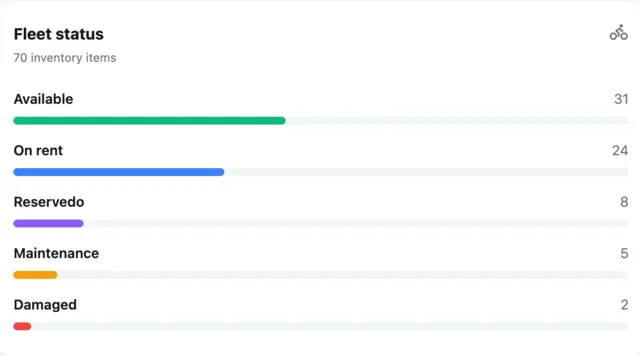
| Status | Available, reserved, on rent, in maintenance, damaged |
| Service history | Shows patterns and drives replacement decisions |
| Purchase date and cost | Basis for depreciation and utilisation return |
You do not need every field on day one. Start with identity, category, size, location and status, and add the rest as you find you need it.
Category first, serial second
The link between the two layers is allocation. Customers reserve a category and size; staff choose the specific bike, either ahead of time for a promised bike or at the counter when the rider arrives. This keeps the booking page simple without lying about inventory, because the category count is the number of ready bikes and the serial is chosen from them. It is the idea at the heart of bike rental operations.
Accessories: what to track
Helmets, locks, lights, panniers and child seats are part of the rental but rarely need individual records. A practical rule:
- Track by quantity for cheap, interchangeable items: helmets, lights.
- Track individually for anything valuable or that carries a key or code: locks, GPS trackers, child seats with a fitting.
- Attach to the booking so the rider’s pickup list is complete.
The point is not to build a perfect inventory of lights. It is to stop the last lock going out on a bike that is not returning to the same shop.
Status is the most important field
Availability is only as good as status. A bike’s status should change through defined events — a rental starts, a rental ends, a check fails, a repair is done — and each change should update what can be sold. If status is edited casually or lags behind reality, every downstream number is wrong.
Two rules keep it honest:
- A bike in maintenance or damaged is unavailable for sale until someone marks it ready.
- A bike cannot be “on rent” and “in maintenance” at once; the system should force a decision.
See maintenance and the maintenance schedule.
Importing an existing fleet
If your fleet lives in a spreadsheet, clean it before you import it:
- One row per bike; no merged cells.
- Unique serial or asset ID for every bike.
- Consistent size labels: pick S/M/L or numeric and stick to it.
- Consistent categories.
- A status and location column.
Most systems, bikerental included, import bikes and customers from CSV on every plan. The cleaner the file, the shorter the migration.
Reports that come from good inventory data
- Utilisation by bike, category and size.
- Sold-out sizes, which show what to buy.
- Bikes that spend disproportionate time in maintenance.
- Revenue per bike compared with its cost.
See bike rental fleet utilisation KPIs for how to use them. For how bikerental models this, read the fleet management page.
Frequently asked questions
Why can’t I just count bikes as stock?
Because bikes differ in size, condition, battery state and service history, so a simple count cannot tell you which specific bike is ready, or which one went out on a given day.
How many categories should a bike rental have?
Enough to reflect how customers choose and how you price, but not so many that availability numbers become tiny. Six to ten is typical for a mixed fleet.
What fields do I need on a bike record?
At minimum a unique ID or serial, category, size, location and status. Add components, battery information and service history as you need them.